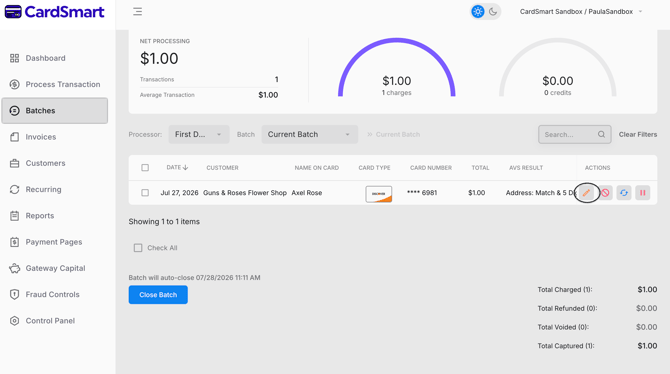
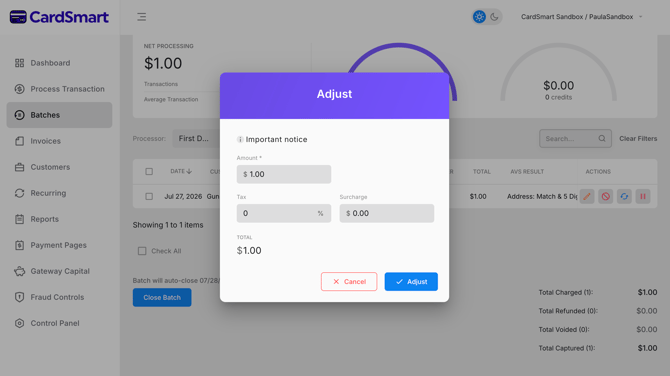
To adjust a transaction, navigate to the Batches tab and locate the transaction you want to modify. Click the pencil icon labeled Adjust. From there, you can update the transaction amount, surcharge, and tax before the batch is settled.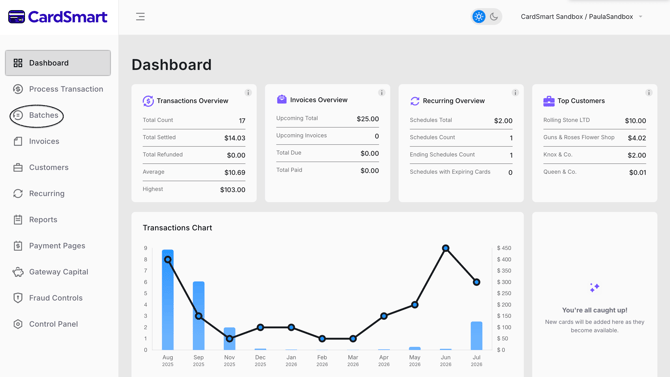
![CardSmart Logo (1) (1).png]](https://www.help.cardsmart.io/hs-fs/hubfs/CardSmart%20Logo%20(1)%20(1).png?height=40&name=CardSmart%20Logo%20(1)%20(1).png)
To adjust a transaction, navigate to the Batches tab and locate the transaction you want to modify. Click the pencil icon labeled Adjust. From there, you can update the transaction amount, surcharge, and tax before the batch is settled.